
Project at a glance
Challenge: Connect a customer-facing EMC service with the employees, processes and records needed to deliver it.
Understand the work
- Organisational goals
- Customer research
- Employee interviews
Map the service
- Leavitt’s Diamond
- Service blueprint
- Responsibilities and hand-offs
Connect the records
- Dataverse relationships
- Reusable customer and EUT records
- Bookings and test activity
Support daily work
- Model-driven employee app
- Guided React customer portal
- Walkthroughs and scenarios
Output: Service blueprint, data model and employee-facing model-driven app developed. Customer portal work remained on hold.
Service design and systems thinking · Industry placement · 2024–2025
GBM - Behind the Scenes
Connecting the service,
people and data.
Designing the operational foundations of GB METECC’s EMC testing service: understanding how employees worked, mapping the service ecosystem and connecting customer requests with shared business records.
- Contribution
- Business-process research, employee interviews, systems mapping, service blueprinting, data modelling, Power Apps and portal integration
Connected records.
01 · Background
The portal needed to support early testing and customer learning.
GB METECC was developing an electromagnetic compatibility (EMC) pre-compliance service. It aimed to help customers understand testing and identify product risks earlier, through clear guidance and access to specialist support.
The research and value proposition from the GB METECC Launch project suggested a role for a customer portal. Customers could learn about testing, organise product information and request support earlier in development.
Each proposed capability also needed a supporting process. A portal feature would create responsibilities for the employees delivering the service, so those implications had to be considered alongside the customer experience.
GB METECC Launch: customer research and value propositionPortal capabilities were considered alongside the work needed to support them.
02 · Employee research
Employee interviews explored tasks and information needs.
Informal interviews explored how employees handled requests, customer details, chamber bookings and test information, as well as how they preferred to work. Workflow notes translated those conversations into tasks, responsibilities and information needs.
Recreating customer records, copying equipment details and making new versions of files add work and opportunities for inconsistency. They can also make the right information harder to find.
The design goal was to carry information forward through the service. Employees would be able to review and update connected records instead of recreating the details for each request.
The workflow showed where information needed to be reused.
03 · Systems mapping
The map connected people, technology, structure and tasks.
Systems mapping used Leavitt’s Diamond to explore people, technology, structure and tasks. It provided a way to consider how changing one part of the service would affect the others.
A portal could change who entered information, who was responsible for its accuracy, which permissions were needed and how employees planned their work. Choosing technology therefore involved decisions about responsibilities and everyday tasks.
Mapping the service before focusing on a screen or tool helped question assumed problems and identify dependencies that an isolated technical fix might overlook.
Changes to technology also involved people, responsibilities and tasks.
04 · Service blueprinting
The blueprint connected customer actions with employee responsibilities.
The service blueprint followed discovery and enquiry through a testing request, preparation, testing and follow-up. It connected customer actions and visible touchpoints with employee activity and supporting systems.
Hand-offs made the dependencies concrete. An employee needed to check availability after a customer requested a date. Access to test information depended on records being maintained and the relevant documents being available.
The blueprint helped identify the work and ownership needed behind each touchpoint before further portal functionality was added.
Customer-facing steps were linked to the processes and people behind them.
05 · Data modelling
Dataverse linked customers, equipment and bookings.
Dataverse provided a shared data layer for the service’s operational records. Data modelling defined relationships between companies, contacts, equipment under test (EUT), bookings, test logs and documents.
A booking could reference an existing customer and EUT. This kept the chamber booking, the requester and the equipment connected in one place, with details available for employees to maintain.
The model was intended to reduce repeated entry and conflicting versions. The customer portal and employee app would use a common source of data, with related records that could be traced and found together.
Record relationships supported the intended employee workflow.
06 · Platform selection
Power Apps provided the employee workspace.
The organisation already worked within Microsoft 365. A model-driven Power App offered an employee interface over Dataverse, with forms and views for reviewing requests, maintaining customer and equipment records, and updating bookings.
This suited the internal work better than developing a separate custom administration application. Employees could manage the shared records through Power Apps, while the React and Next.js application focused on guiding customers through their tasks.
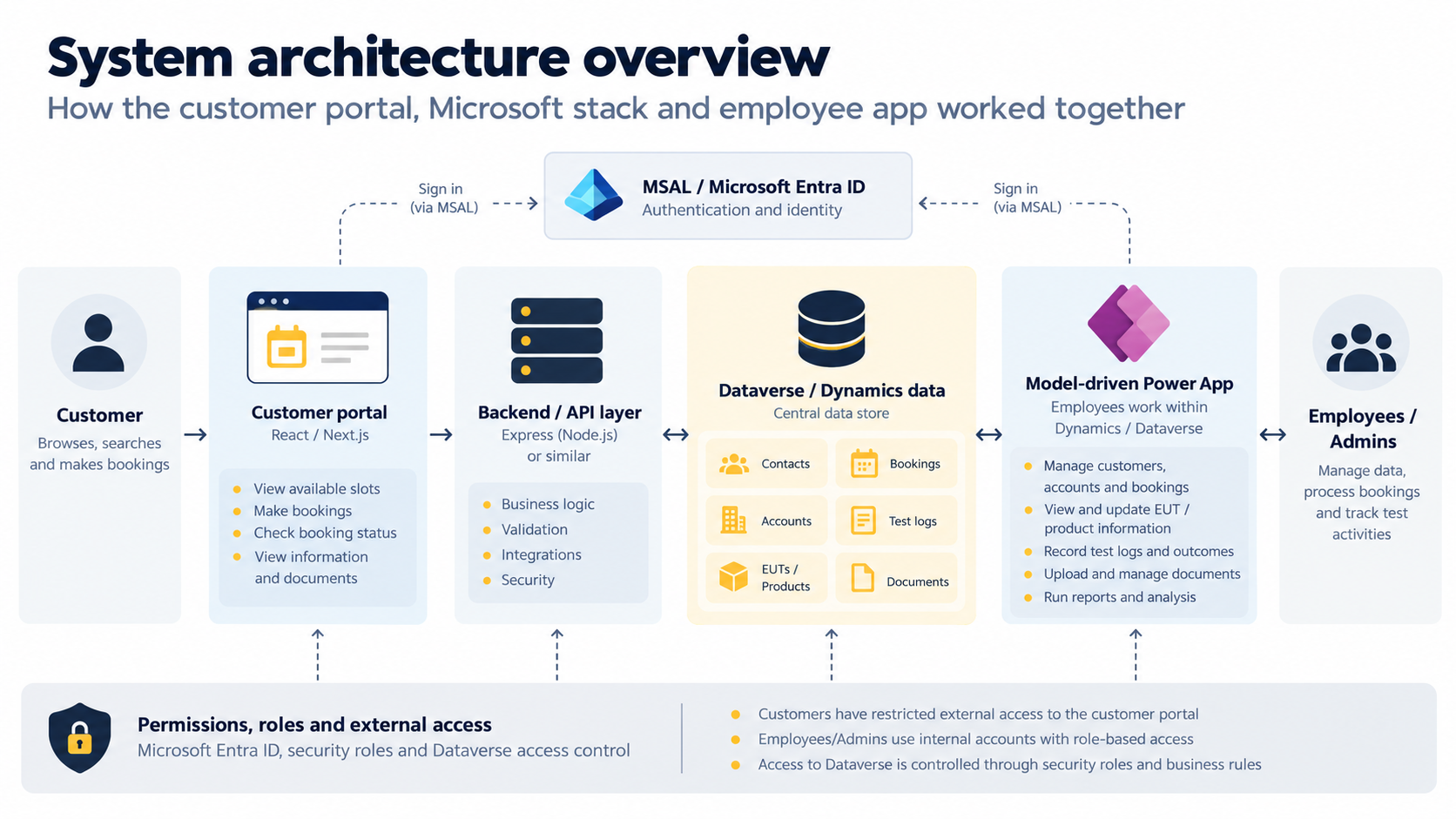
Microsoft Authentication Library (MSAL) supported sign-in and token handling for the customer application. An Express API communicated with the Dataverse Web API. Authentication, API access and record permissions were distinct parts of that integration.
The custom API still connected the portal to Dataverse. Using Power Apps avoided rebuilding the employee management interface and creating another operational database.
Customers and employees could use different interfaces over shared records.
Customer portal
React and Next.js for a guided customer journey, with MSAL authentication work and API access to shared records.
Employee workspace
A model-driven Power App for reviewing requests and maintaining related records in the existing Microsoft environment.
Shared data
Dataverse relationships connect customers, EUTs, bookings and testing activity across the two interfaces.
07 · Booking workflow
Booking requests needed review before confirmation.
The request flow collected the selected service, preferred dates and EUT details before a review step. Customers could reuse an equipment record for repeat testing without entering the same product details again.
Preferred dates were requests, not confirmed appointments. Employees needed to review them and check chamber availability before confirming the booking.
The flow connected what customers submitted with what staff needed to act on. Service choices, dates and equipment details would stay attached to the request as it moved into the employee workflow.
The request needed enough connected information for staff to review it.
08 · Evaluation and reflection
The employee app was developed; the customer portal remained on hold.
Cognitive walkthroughs and scenarios examined how the proposed workflows supported customer and employee tasks. Alongside informal employee interviews, they helped question whether the information, flow and next actions made sense.
The work produced a service blueprint, connected data model, portal flow and employee-facing model-driven app. The customer portal was put on hold before a complete release. Reductions in errors, duplicated work or administrative time were not measured.
The project reinforced the need to understand the wider service before choosing a technical response. People, ownership, tasks and data relationships had to be considered together to support the intended customer experience.
The project connected customer tasks with employee work and shared data.